 Is There an App?

Dashlane Password Manager
by Dashlane
Save passwords and autofill account credentials.
What it does
Autofill credentials, generate passwords and review breach alerts. The listed features require a Premium or Friends & Family subscription.
Pricing: is Dashlane Password Manager free?
The app is free to download, but its listed features require Premium or Friends & Family. The personal website offers a 14-day trial. Exact subscription prices were not exposed in the reviewed page; check current checkout. Checked 3 October 2026.
Common questions
Is Dashlane free to use?
A free download is not a free ongoing password-manager plan. The iOS listing says its described features require Premium or Friends & Family, and the personal website advertises a 14-day trial.
How much does Dashlane cost?
Choose the personal Premium or Family plan and check the current checkout for your currency and billing period. The reviewed public page did not expose a numeric price, so we have not guessed an amount or substituted business-plan pricing.
Answers reviewed . Source-based research; not hands-on testing.
Screenshots
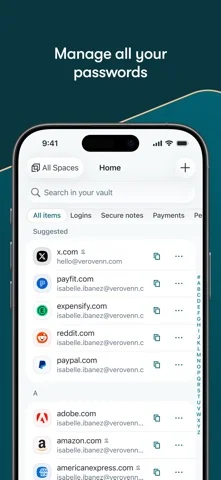
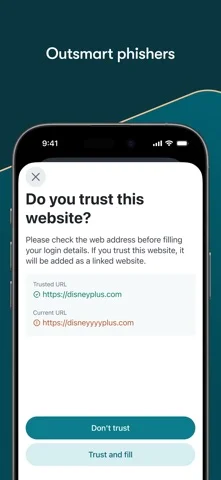
Developer-provided iOS screenshots.
Features
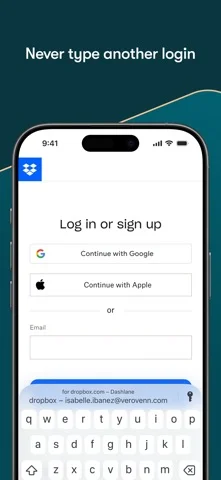
Autofill saved information
Fill saved logins, payment details and personal information across supported apps and browsers. The listed features require Premium or Friends & Family.
Developer’s App Store feature description (iOS)Generate passwords and sign-in codes
Use the password generator to create distinct passwords and the built-in authenticator to access one-time sign-in codes. A paid plan is required.
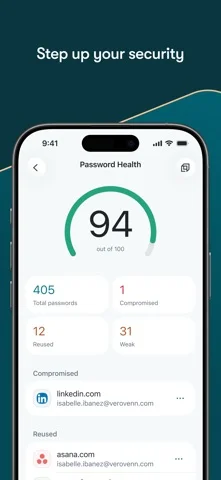
Developer’s App Store feature description (iOS)Review password health and breach alerts
On a paid plan, review a Password Health score and recommended changes for weak or reused passwords, with alerts for detected leaks.
Developer’s App Store feature description (iOS)Organize and share vault items
Group information into Collections and share passwords or Secure Notes with family or friends. These tools are part of the paid offering.
Developer’s App Store feature description (iOS)Receive suspicious-site warnings
Vault phishing alerts can appear when filling or pasting credentials into a suspicious site or an app not associated with the account. This is a paid feature.
Developer’s App Store feature description (iOS)Sources & verification
- Dashlane Password Manager: developer's App Store listing (US)Primary source
- Developer’s App Store feature description (iOS)Primary source
- Developer’s US App Store listing: Dashlane Password ManagerPrimary source
- Dashlane personal plansPrimary source
Last verified: 22 September 2026. Features not listed here may be unverified.
Are you the developer? Claim this listing →